Web Video Editor
Multi-track timeline in the browser
A browser-based editor built around one timeline model, so the state you edit, the playback you see, and the file you export stay aligned.
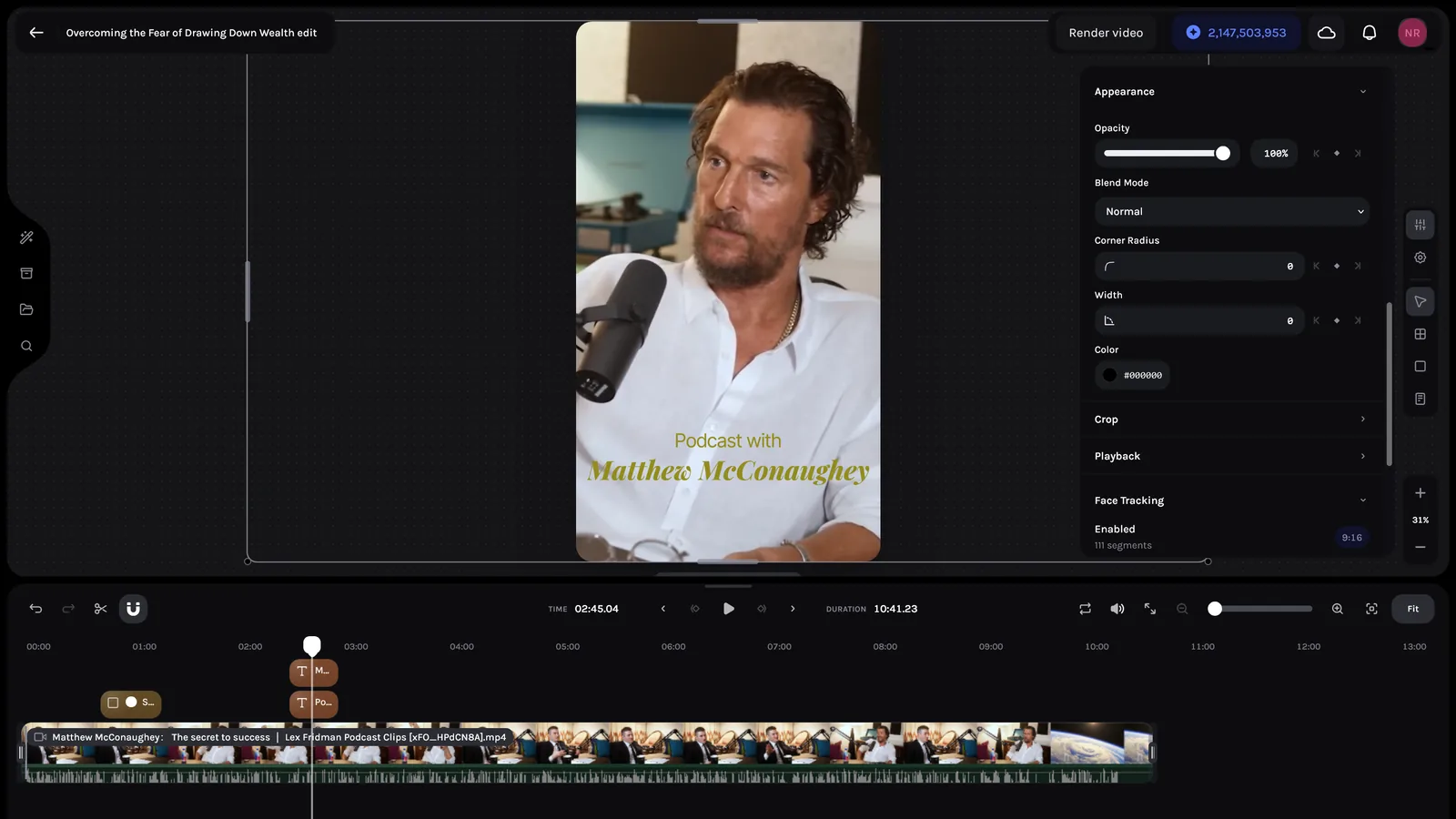
One model, three surfaces.
A browser-based video editor where what you edit, what you preview, and what you export are all the same thing.
The editor treats a video project as a normalized item graph: tracks, typed items, and assets shared between the editing UI, live playback, and export. Preview and render are not separate authoring systems. That was the core architectural bet.
The bet paid off in reuse. The same core now runs two authoring modes, carries a keyframe and layout engine, syncs multiple people into one timeline, and takes instructions from a model, all without a second representation of a project.
Routes to render,
four zones.
Two authoring modes mount the same editor shell, parameterized rather than forked. The shell reads and writes synchronized project state, and both playback and export consume the same normalized item graph directly.
Two layers, one truth.
- 01
The undoable layer carries the project
Tracks, items, assets, dimensions, and fps live in a bounded history stack. Every structural edit is a snapshot entry. Undo and redo fall out without extra code.
- 02
Transient state stays local
Selection, editing modes, task state, trim indicators, and snap guides are volatile. They belong in the editor but not in history or synchronized storage. So do loop mode, snapping, and panel height, which persist locally per person rather than as shared project fields. The separation is explicit in types.
- 03
Focused context fanout
Twenty-seven narrowly scoped React contexts replace a single large context object. More nesting, tighter render boundaries. In a dense interactive UI, that trade is worth it.
- 04
Strict-mode-safe commit pattern
The history provider applies a mutation without committing first, then commits a no-op entry if one is needed. This guards against duplicate history entries from React Strict Mode double invocation in development.
The undo boundary
is in the types.
Editor state wraps two distinct layers. The undoable layer holds everything that belongs in project history. The transient layer holds everything that does not. The types enforce that split, not convention.
Properties over time.
A timeline of clips became a timeline of properties. Items carry keyframe tracks and participate in a layout tree, which means the composition is no longer a flat stack of absolutely positioned layers.
- 01
Keyframes are per-property tracks
Any numeric property on an item can carry its own list of keyframes, each with a frame, a value, and an easing. Evaluation happens at render time from the item record, so a keyframed property costs nothing extra to store and nothing extra to sync.
- 02
Frames nest, and layout follows
The frame item type is a container. Children reference a parent, and the layout engine resolves flex and grid arrangement, hug-versus-fixed sizing, and absolute pinning inside it. Editing a parent relayouts its subtree instead of leaving children stranded at stale coordinates.
- 03
Structure invariants get repaired, not enforced
Nesting introduces orderings the timeline can violate: a parent landing on a track below its child renders wrong. Rather than blocking the interaction, the save path detects the inversion and rewrites track order to restore it. Direct manipulation stays permissive, and the boundary recovers correctness.
Where it sits,
what it does.
I added two axes to the same item record. Position became a question the parent answers rather than a pair of coordinates, and any numeric property became a track of keyframes evaluated at render time.
Two editors, one timeline.
Project state syncs through Polynomial, the realtime service I built separately. The editor is its heaviest production consumer, which is a useful place to be: every weakness in the sync model shows up first as someone's edit disappearing.
- 01
Snapshots carry a content signature
Every undoable snapshot hashes to a short signature. The sync layer compares signatures, so an unchanged project never writes, and it recognizes an inbound snapshot the client already knows about instead of re-applying it.
- 02
Your own writes echo back
Shared storage broadcasts to everyone, including the sender. Without tracking which signatures are in flight, the round trip lands as remote state and overwrites newer local edits. The client holds its pending signatures until they come back acknowledged, so it never mistakes its own write for someone else's.
- 03
Remote state defers to an active gesture
Applying an inbound snapshot mid-drag makes the item jump under the cursor. The classifier checks incoming state against local revision counters and interaction status, then holds it rather than applying it while the user is mid-edit.
- 04
A poorer snapshot can't overwrite a richer one
Reconnects and cold mounts can present a nearly empty project. A scorer weighs candidate state on items, track references, assets, and keyframes, and rejects it unless it is structurally valid and no thinner than what's already on screen. This is the guard that stops a bad reconnect from emptying someone's timeline.
- 05
Presence is separate from the document
Cursors on both the canvas and the timeline, live item geometry while someone else drags or resizes, and remote playhead position all travel as presence, never as project state. Nothing collaborators broadcast about themselves can enter the undo stack.
Four answers,
one of them yes.
Most of the work in live editing is deciding what not to do with a snapshot that just arrived. Three of the four outcomes leave the document exactly as it was, and every bug worth fixing here was a snapshot taking the wrong branch.
Local first, remote when ready.
Two import paths, one destination. A dropped file and a library asset produce the same normalized asset and item records, so insertion, playback, and export never learn where the media came from.
- 01
Upload doesn't block insertion
Dropping a file creates a local preview source, caches the file client-side, and lands the item in the timeline. Upload starts in the background. Authoring continues even if it fails.
- 02
Library assets are deliberately not cached
Assets that already exist remotely arrive with metadata in place, insert as remote-backed items, and stream directly. Caching them would duplicate storage the platform already owns to no benefit. Where a lighter playback rendition exists, editing plays that instead of the master.
- 03
Blob URLs are owned and checked
Browser-managed blob URLs can become invalid over long sessions. The editor reference-counts each local URL against whatever is using it, releases it when the last owner goes away, and rechecks it on a timer. If a local URL is unavailable, playback falls back to the remote source without intervention.
The editor authors its own presets.
The most useful thing the shared model bought was a second product built on the same core. Instead of writing a bespoke tool for designing reusable looks, I parameterized the editor into one.
- 01
A style is a document of timelines
A style holds several named effects, and each effect is a complete undoable state of its own. Authoring one means loading it into the same shell, with the same timeline, inspector, and canvas the draft editor uses. There is no second editor to keep in sync.
- 02
The shell takes parameters, not forks
One prop set decides which side panels exist, whether the surface is read-only, what a saved snapshot is written back into, and which preview clips the canvas shows. Both modes run the same component tree.
- 03
Published styles are consumed downstream
Finished styles publish to a registry, and automated pipelines apply them to media the author never opens. Design happens once, interactively, on a real timeline. Application happens at volume, without a browser.
The document as an interface.
A language model can edit the project. The design question was never which model. It was what the model is allowed to touch, and the answer is the same typed set of properties a human gets.
- 01
Properties are a registry, not a prompt
Every editable property is declared once with its type, its permitted values, and the mutation that applies it. That registry is what gets described to the model. Adding a property to the inspector adds it to the model's vocabulary in the same commit, so the two can't drift.
- 02
The model returns a plan, not state
The response is a sequence of typed steps against known properties, bounded in length and payload. The editor validates it before anything moves, and rejects it whole if any step references something outside the registry. The model proposes. The editor decides.
- 03
Application goes through the same actions
A validated plan runs through the ordinary edit actions and lands as a single history entry. Undo reverses a model edit exactly like it reverses a drag, and a partially applied plan is not a state the document can end up in.
One gate
before the document.
Everything left of the gate is a proposal, including the model's output. The plan is checked against the same registry that produced the capability set, and a plan that fails any step is discarded whole rather than partially applied.
Same model, rendered to file.
- 01
Shared composition root
The editor has its own composition that calculates metadata from current items, derives final duration from content, and injects font information from text and caption items. The same layer graph the editor renders interactively is what the export uses for file output.
- 02
The editor's job ends at enqueue
Triggering an export writes a job into an application-level queue and returns. An orchestrator mounted outside the editor invokes the render, polls it, and handles completion, so a render survives closing the editor and finishes into a download or straight back into the library.
- 03
Export reduces preview drift by construction
Because preview and export share a composition, drift has to be written in deliberately. It shows up as two code paths disagreeing, which a reviewer can catch, rather than as a bad file nobody sees until the render lands.
Six steps,
one output.
The editor queues a job and stops there. The orchestrator validates the payload, builds render input from tracks, items, and assets, enriches it with font metadata, and starts a background render. It polls progress until the render completes, then delivers the output according to the job's completion action.
The things that would jank.
- 01
Cross-track timing cascades
Trimming one clip shifts effects, captions, and crossfades on neighboring tracks. With nested frames, it also relayouts every descendant. Naive updates cascade into full re-renders across the timeline.
- 02
Aggressive interaction rates
A drag-resize on a long clip fires hundreds of updates per second. Anything more expensive than constant-time breaks playback.
- 03
Preview and render disagree
Live playback and final export carry subtly different timing assumptions. Exports drift from what the user saw on screen.
- 04
Blob URL lifetime
Browser-managed blob URLs can silently expire in long sessions. Without ownership tracking and periodic checks, assets disappear from playback without error.
- 05
Sync fighting the user
A collaborator's snapshot landing mid-gesture, or a client's own write echoing back as remote state, both read to the user as the editor undoing them. Neither is a rendering problem and neither is fixable in the UI.
What I locked, what I left.
Shared composition model
Preview and export share the same composition root and item graph. Drift between them requires code to actively diverge.
Normalized state over component-local state
Item, asset, and track relationships stay explicit. Undo/redo is tractable. Inspector, timeline, canvas, and export all read the same shape.
Local-first media UX
Uploads don't block editing. Files are cached client-side immediately. Authoring continues through upload failures and slow networks.
Live sync over file save
Synchronized shared storage means there is no save button and no unsaved document to lose. Volatile UI state stays out of shared project state.
One typed surface for humans and models
The property registry is what the inspector renders from and what the model is told about, at once. A capability can't exist for one and not the other.
Context fanout over a single store
Dozens of narrowly scoped contexts instead of one object. More provider nesting, tighter render boundaries. Dense interactive UIs benefit from targeted subscriptions.
Built on inherited structure
The feature sits on top of an earlier editor's structure. Some older naming and layout remain visible. Faster delivery, visible evolutionary history.
Interactive code must stay disciplined
Sharing a composition between editor and renderer requires care about what is player-only UI versus render-time logic. The boundary isn't enforced by the framework.
Blob URL management overhead
Local-first media requires tracking URL lifetime, cache consistency, and dual local/remote source resolution. The simplicity is in the UX, not in the implementation.
Sync correctness lives outside the UI
Signatures, revision counters, and deferral rules are invisible when they work and inexplicable when they don't. The logic is isolated and tested on its own, because it cannot be debugged by looking at the screen.
What the model bought us.
Multi-track edits stay smooth through aggressive drag interactions. Indexed state makes per-item updates constant-time regardless of timeline length.
Live preview and final export read the same selectors and the same composition. Surprises at render time require the code to diverge actively.
Undo/redo, keyframes, a second authoring mode, and model-driven edits all landed against the existing item graph. Each one reads and writes the shape that was already there.
What shaped the editor.
- 01
Shape the data before the framework
Most timeline pain is in how state is represented, not what renders it. Normalized indexed maps made the rest of the system cheaper to build.
- 02
The renderer is a consumer
If preview and render disagree, the renderer is rarely where to fix it. The answer is in shared state. Move it there once and both surfaces follow.
- 03
Local-first is a UX contract
Committing to local-first media means the feature must manage blob URL lifetime and cache consistency. The implementation cost is real. The UX benefit of editing without waiting is worth it.
- 04
Volatile state doesn't belong in shared storage
Synchronized storage is for project content. Transient UI state persisted to shared storage introduces subtle race conditions and stale rehydration bugs. The split is strict by design.
- 05
Collaboration is a data problem before a UI one
Nothing about live editing was solved by drawing cursors. It was solved by deciding what identifies a snapshot, which writes a client should recognize as its own, and when the document is allowed to change underneath a gesture.
- 06
A good model surface is already a good tool surface
Exposing the editor to a language model needed no separate abstraction. It needed the property surface to be declared rather than hand-written, which the inspector wanted anyway. The interface a model can use is the one a person could have scripted.
Polynomial
Realtime collaboration infrastructure